Posts

Showing posts with the label Hardware

Network Attached Storage (NAS) Comes Home

These days it is not uncommon for home networks to rival the business networks of 10 years ago. Rather than having the family computer that everyone has to share, people may have more than one desktop, a laptop or two, tablets, and smartphones. This  can make finding files hard... they are saved in local folders by default, so if you created, say, an address list for mail merges on your laptop, but then need to refer to it later while on your desktop, it is not available. How can you make this work better? You could set up a machine to serve as a file server (using something like a Windows HomeGroup , or more basic NTFS or SMB  shares) and use it as a repository for your files. This works well, but it can be complicated to set up and maintain, and the files may not be accessible to all your devices. Using a cloud-based service such as SkyDrive also works, but there is still an accessibility question and you can lose access to files if your Internet connectio...

OEMs Aren't Always Right...

OK, the title is obvious. Who hasn't grumbled at the default system settings on a new computer, or immediately uninstalled all the clutter placed on a system by the manufacturer? To me, it's another argument for building (or at least designing) your own systems. But I digress... on to the post. The dumbest thing I have done in a while is trust that the company that sold a server knew what was best when they set it up. By doing so, I decided to not make any changes to the overall system configuration before passing the "point of no return," where I would have to reinstall the entire system to change things. I was helping a friend set up a server for his small business. Initially, I was thinking about getting a Windows 2008 server and setting it up as a Domain Controller and file server. When we were looking at systems, Microcenter had a server with SBS 2011 and decent specs for less than their basic Windows 2008 server system, so we decided to go with that. I won...

Building a Box - Upgrading

Image
In the short time since I finished building my custom PC , I have done a couple of upgrades to the components and played around with overclocking in order to improve overall system performance. In this post, I will cover the new components I have added, and I will have a separate post on overclocking in the near future. New Components Since the build, I have added an aftermarket cooling system to improve cooling when overclocking (see Overclocking Without Permission for details on why it was necessary), added a blu-ray RW drive, and increased cooling capacity even more by putting another fan in the case. The end result is that I can now play and backup blu-ray movies, and I can burn my HD home movies in actual High Definition without worrying that my computer will overheat when encoding the videos (that wasn't an issue when the system was running at stock speeds). Blu-Ray Drive   The Blu-Ray drive I added is an LG WH14NS40 , a SATA 14x Blu-Ray burner that supports BDXL,...

Overclocking Without Permission

Image
Sorry for the long delay between posts this month. I really want to try to get to posting a couple of posts a week, but Real Life keeps popping up and using up my time. In any event, I am going to try to get back to that frequency starting now. I have a lot of ideas for posts, and am going to start actually typing them up. I'll start off with something I promised a while ago. As I mentioned in the post about my custom PC build , I had an issue with the system crashing randomly. It only crashed twice - once when I was running the Windows Experience Index, and once overnight. This worried me because it was a brand new system, and everything should have been in tip-top shape - unless I screwed something up (or received a faulty piece of equipment). I was really hoping I wouldn't have to redo all or part of the build. Luckily, I enjoy troubleshooting almost as much as I like building PCs, so I put on my thinking cap (do they still make those) and started working. When I check...

Building a Box - The Build

Image
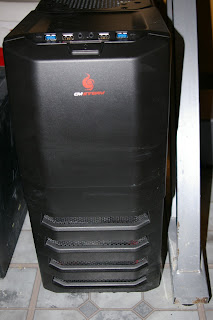
Meet my new PC Well, this is progressing much faster than I thought. I am actually typing this on the box that the series is about. The combination of Black Friday/Cyber Monday sales, and Christmas presents made it possible to get most of the parts, and a great sale on the processor at Microcenter (more than $100 off list, and at least $60 less than the best sale I found online) sealed the deal. Final specs As my uncle pointed out  in the comments of the last post, I didn't really talk about the Power Supply or the case. In order to support future expansions, I decided to go with a 600 watt power supply. As I add graphics cards and other components, this will ensure that I have ample power available. I also selected a mid-tower case. This has plenty of space for HDDs, SSDs, optical drives, and, most importantly, cooling fans.  Parts List If you read my last installment , you're aware of the general specs of the machine. Here is the list of specific parts I us...

Sony Vaio SVT13128CXS Review

I recently obtained a new Sony Vaio Ultrabook - the SVT13128CXS. This is a robust laptop that can easily serve as a desktop replacement while, at 3.77 lbs. and .71" thick, being small an light enough to not be a burden to carry around on a daily basis. Specs The Vaio SVT13128CXS has a 13.3" multitouch screen and comes with an Intel Core i7 3517U CPU running at 1.9 GHz, a 256 GB Solid State Drive, and 8 GB of RAM, and the Windows 8 Operating System . It has all the common ports: HDMI, VGA, Ethernet, 1 USB 3.0, 1 USB 2.0, and a MemoryStick/SD card slot, and has built-in 802.11 b/g/n wireless as well as Bluetooth 4.0. It also has a 1.3 MP HD Web cam. Design Like most high-end Vaio laptops, the SVT13128CXS looks great. The brushed aluminum casing and sleek lines look good and resist fingerprints. It feels solid, and, while a little thicker than some of the offerings out there, at .71" it is still very thin. The ports are easy to access and are spaced well enough t...

Building A Box - Specs

I've done a lot of thinking about the specifications of the computer I am going to build . My two main priorities are speed and storage. I use my main PC for video editing, some Web development, and as a media server for the house. I figure that whatever I build will replace it as my main desktop, and then I can give my current machine (a two-year old Dell Studio XPS 8100) to my wife. Motherboard Since the motherboard was a gift, there wasn't really a choice. It is an ASUS P8Z77-M Pro , which is a decent Micro ATX board that supports 3rd gen Intel  processors. It is a little light on the internal expansion ports (three total), but has decent built-in sound and video as well as support for several USB ports (front and back) in both 2.0 and 3.0. It can handle up to 32 GB of memory. Processor Since I have the luxury of shopping around and buying parts over time, I am looking at getting the Core i7 3770k processor. It is currently the fastest Core i7 that...

ASUS delays release of Taichi

This is a bummer ... I had been hoping to get one of these, but when they didn't come out for over a month and there was no word on how long they were delayed, I decided to get my Sony Ultrabook instead.

Building a Box

My brother-in-law recently gave me a motherboard. He had been thinking about building a PC, but life got ahead of him and he decided he wasn't going to do it just yet. Since he was also moving to Australia, he decided it was something he didn't want to take with him. It took me a while to decide what I was going to do with it. I've never built a complete PC all at once. I've replaced every part in more than one system, but that usually would take place over a couple of years. It's not that I didn't want to build a computer, but it was generally less expensive to buy something pre-made and then tweak it. But now I had this shiny new motherboard, and a pretty decent one at that. So I decided to take the plunge. This seems like a great topic for a series of posts... walking through the process of obtaining the parts and software, putting it together, then testing and running benchmarks to see if it will perform as well as I hope. I'll start with a post...

Early Christmas!

Had a little early Christmas yesterday... well, technically a late birthday. I got a Sony Vaio T-series ultrabook and a 64 GB Microsoft Surface RT . Playing with them now. Quick first impressions of the Vaio: this thing is incredibly fast... from power off to using Office 2010 apps in under 20 seconds, including the time it takes to enter my password. Also, this is the kind of machine Windows 8 was made for. Surface RT impressions: decent tablet, but quirky. System messages call it a PC, which makes me chuckle when I see them. Not seeing the speed issues I read about in the early reviews, but mine updated right when I got it. Office 2013 RT is the best tablet office suite I have used, and it integrates well with my SkyDrive. I'm impressed with Microsoft's work on creating a seamless ecosystem... I upgraded my desktop when Windows 8 came out, and when I set up both systems, my settings (including wireless network settings) synced. I set the Surface up at ...